beagrep, grep 2G source code in 0.23 second
Beagrep can grep readlink in Android source code in 0.8 0.231 second when
cache is hot, and about 11 seconds when cache is cold.
Using ag or ack or bare grep, the results are a couple of seconds when cache is hot, or a couple of minutes when the cache is cold2.
1 Introduction
I still remember when I read the ``Linux Device Drivers'', 1st Edition, in the preface, the author says:
… The text you are approaching is the result of hours of patient grepping …
I have been using grep to read source code ever since. It's been
adequate for a long time, until I started reading Android source code
with it. I remember vividly how it took me 30 minutes3
to grep readlink in Android source code (with VCS directory and
binary files excluded).
Then I learned about the beagle software which is a desktop search
engine, and it occurred to me, what if I use beagle and grep together?
I mean, to use beagle first to decide the (relatively a lot smaller)
set of possible matching files (i.e., files that contained the word
readlink, taking the previous example), then invoke grep on this set
only. Usually the job can be done in the blink of an eye.
Beagrep is available on GNU/Linux, Mac OS (requires MacPorts) and Windows (requires CYGWIN). It also works with CJK characters correctly, as long as the document is in utf8.
Because beagrep is so fast, I have also developped some more use cases besides simply grepping through Android source code, for e.g., finding function call sites.
There are other tools similar to beagrep, discussed at the end of this blog.
(Note a Chinese version of this page is available here, but it may be outdated).
2 Install
2.1 Linux install
2.1.1 Compile by yourself (the preferred way for Linux install)
To compile beagrep by yourself, using Ubuntu precise as an example:
git clone https://github.com/baohaojun/beagrep.git -b for-ubuntu-precise
# you can also run "git branch -a" to see other versions of debian/ubuntu supported

# Install build dependencies. You can open debian/control and check
# the build dependencies and install all of them. The following
# command will try to install them automatically, but if it fails then
# you need figure out which packages to install manually. Good luck!
# Or you can contact some debian/ubuntu advanced user for help.
apt-get install $(cat debian/control | perl -ne 'print if m/Build-Depends/..m/Standards-Version/'|grep -v -e Build-Depends:\\\|Standards-Version|perl -npe 's/,/ /g')

# do the build
(set -e; autoreconf -i; ./configure; make -j4; sudo make install; echo OK)
2.1.2 Use Ubuntu PPA
If you are using ubuntu LTS version such as 12.04 or 14.04, you may use my personal ppa and install from that, for e.g., to install beagrep on ubuntu 14.04, you can run the following commands:
sudo add-apt-repository ppa:baohaojun/beagrep-14.04 -y
sudo apt-get update
sudo apt-get install beagrep
2.1.3 Build .deb by yourself
Before someone volunteer to make beagrep into debian/ubuntu distribution, you might also find a need to build .deb by yourself (for e.g., to help your colleagues use beagrep easily without needing to compile it themselves).
Here's how I do it:
- Make sure you can compile beagrep manually by referring to the previous section.
- Make a tar.gz of beagrep (note that the filename must be exact, it
is required by dpkg):
tar czfv ~/.cache/beagrep_0.4.0.orig.tar.gz beagrep --exclude-vcs
- Untar it and build the .deb package:
cd ~/tmp
tar zxfv beagrep_0.4.0.orig.tar.gz
cd beagrep
dpkg-buildpackage
The .deb file is generated in the
~/tmpdirectory. - Install the .deb file:
dpkg -i beagrep_0.4.0-1_amd64.deb
# The above step will probably get dependency errors, so you fix it:
apt-get -f install
# This will install the dependence packages.
2.2 Windows install
Windows install can only be done compiling by yourself, and be warned, it's not easy…
2.2.1 Install dependencies
You need install CYGWIN, Mono and sqlite for Windows.
For cygwin, you will need the following packages as the minimum (there might be more, though I have tested these should be enough):
nc util-linux git vim rsync inetutils apache2 shutdown make
gnome-common gcc-core gcc-g++ mingw-gcc-core mingw-gcc-g++
mingw64-i686-gcc-core mingw64-i686-gcc-g++
mingw64-x86_64-gcc-core mingw64-x86_64-gcc-g++ screen
cygutils-extra procps wget git-svn
(See after-check-out.sh for how I installed these packages automatically).
For Mono, default download and install from mono project website is OK.
For sqlite, you need download the .zip file for Windows and extract the .dll into your $PATH.
2.2.2 Get beagrep Windows code
git clone git://github.com/baohaojun/beagrep.git -b for-windows
2.2.3 Compile and install
cd beagrep
bash build-win.sh "/cygdrive/c/Program Files (x86)/Mono-3.2.3"
Now, the argument to build-win.sh is the folder where I have installed
mono, on my windows7, it is /cygdrive/c/Program Files
(x86)/Mono-3.2.3. One thing very important in building and using
beagrep on Windows is to get the directory name format correct,
because Windows has very weird characters in its pathname, : and
Space, which is harmful for writing Makefile and Shell scripts,
respectively.
3 Usage
3.1 Quick smoke test
cd /tmp; mkdir $$; cd $$; echo main > 1.txt; mkbeagrepidx; beagrep -e 'main' --grep '--color=auto'; true; cd ..; rm $$ -rf
If beagrep has been installed correctly, at the end of the above
command's output, you should see something like
/.cache/11468/1.txt:1:main.
3.2 Create index
In your source code directory, using android as example:
cd ~/src/android
mkbeagrepidx
This step will cost you quite some time, under my Linux indexing Android cost me about half an hour (it's about the same time you run grep directly on android source). So I'd advise you create a cron job to do it at midnight.
It takes about 8 minutes to index linux kernel (v3.6-rc6):
Debug: IndexWorker Done
Debug: Elapsed time 478.01s.
But the good news is if indexing has already been done before, there re-indexing will only work on those updated files based on file time-stamp. So it will cost you only a few minutes to re-index the whole Android source.
Even better, after an initial indexing, you can do a sub-folder
re-index, mkbeagrepidx will ask you if you want to update the index
found for upper directory. This generally only takes seconds depending
on the size of the sub-folder.
3.3 Man page for mkbeagrepidx
mkbeagrepidx is a simple wrapper over beagrep-build-index. You can
configure it for which directories to ignore using
--deny-directory-pattern option. By default,
- The
$PWD/outis ignored, because it contains android build output - The */.git is ignored, because of well known reason
- The */.repo is ignored, for the same reason.
The syntax is comma separated shell glob patterns, and you can check how it is converted into regular expression by examining the beginning of mkbeagrepidx output:
Always: Will ignore directories matching regular expression: ^(?:/home/bhj/tmp/test/out)$|^(?:.*/\.repo)$|^(?:.*/\.git)$
You can customize it using several ways, in the order of increasing priority:
- Not customize it, then the default
"$PWD/out,*/.repo,*/.git"
will be used.
- Override it in
~/.mkbeagrepidx.rc, setting theBEAGREP_IGNORE_DIR_PATTERNSenvironment variable:export BEAGREP_IGNORE_DIR_PATTERNS="$PWD/out,*/.repo,*/.git"
- Override it in the .mkbeagrepidx.rc in the current working directory, same as the above.
- Override it on the command line (you must repeat the default pattern
because it won't append):
mkbeagrepidx --deny-directory-pattern "$PWD/out,*/.repo,*/.git,*/.svn"
3.4 Searching using beagrep
Under your source code directory:
cd ~/src/android
beagrep -e "readlink"
3.4.1 Man page for beagrep
Here's a list of all arguments that beagrep takes:
beagrep -e REGEXP_MATCH [-p REGEXP_PATH] [-a ADDITIONAL_WORDS] [-v REGEXP_REVERSE_PATH] [-i] [-f] [-l] [--grep GREP_OPTIONS] [-a]
- -e
REGEXP_MATCH - This is the minimum required arguments. For e.g.,
beagrep -e readlinkThe
REGEXP_MATCHserves 2 purposes:- First, it is computed into whole words for querying beagle. For
e.g.,
l] [--grep GREP_OPTIONS]above should be matched with the following REGEXP:l\] \[--grep GREP_OPTIONS\], but it should be converted into 4 words:l grep GREP OPTIONSfor beagle. - Second, it is used as the regexp for grep to work on.
- First, it is computed into whole words for querying beagle. For
e.g.,
- -a
ADDITIONAL_WORDS - means to add more words into the beagle query. This is useful by increasing the work beagle need to do, but reduce the possible work set grep need to work on.
- -p
REGEXP_PATH - means to limit the search result to those files whose path-name matches
REGEXP_PATH. - -v
REGEXP_REVERSE_PATH - means to exclude those matched files whose path-name matches
REGEXP_REVERSE_PATH. - -i
- means to do case insignificant grep.
- -f
- means to do the match in file-names only. For example,
beagrep
        -e readlink -f
will only show results like readlink.h and readlink.c.This is very useful for finding files. Note that when
-fis used, the beagle querying words will be computed differently: only the basename will be used, andfilename:is prepended onto each words. - -l
- means to list the beagle matched list of files directly, without running grep to match on them.
- –grep
GREP_OPTIONS - means to pass additional arguments to the
grep invocation. For e.g., the
-largument can be passed to beagrep directly, or it can be passed using--grep, they mean different things:beagrep -e "hello world" -lwill show a file containing "hello wonderful world", butbeagrep -e "hello world" --grep -lwill not show that file as a match.
4 How does it work?
beagrep is a very practical software, it works because of the following observations:
4.1 grep patterns are usually simple
Or rather, they can be decomposed into several simple sub-patterns: whole words.
For example, to grep such a seemingly complex pattern in Android source code:
"JsonToValue(\"\\\\\"hello world\\\\\"\","
In fact, it contained some simpler sub-patterns, i.e., those 3
wholesome English words: JsonToValue hello world. For a file to
match this complex pattern, one necessary but not sufficient condition
is for this file to contain all these 3 words. And what is good for
this job? A search engine! Using beagle, the parent project for
beagrep, a desktop search engine, you can find which files (actually,
which file in this case) contained these 3 words in the blink of an
eye.
Only 1 file contained all 3 words:
$beagrep-files 'JsonToValue hello world '
Beagrep index found at /home/bhj/.cache/for-code-reading//home/bhj/src/gingerbread-tegra/.beagrep
/home/bhj/src/gingerbread-tegra/external/chromium/base/json/json_reader_unittest.cc
/dev/null
So, you can imagine how quick it is to run grep on the set of files containing all required words:
beagrep -e "JsonToValue(\"\\\\\"hello world\\\\\"\","
pat is: 'JsonToValue("\\"hello world\\"",'.
beagrep query argument `JsonToValue hello world '
Beagrep index found at /home/bhj/.cache/for-code-reading//home/bhj/src/gingerbread-tegra/.beagrep
/home/bhj/src/gingerbread-tegra/external/chromium/base/json/json_reader_unittest.cc:168:  root.reset(JSONReader().JsonToValue("\"hello world\"", false, false));
Unmatched ( in regex; marked by <-- HERE in m/JsonToValue( <-- HERE ""hello world"",/ at /home/bhj/system-config/bin/beagrep line 98.
To summarize, complete words are what search engines are good for, and
fortunately, when grepping source code, we almost always grep using
whole words, instead of sub-words. For e.g., this evil pattern
r.*e.*a.*d.*l.*i.*n.*k can match our readlink, but do you really
need that power of grep?
4.1.1 BTW, creating the regexp pattern automatically in Emacs
From the example above, you can see the actual matched string is:
JsonToValue("\"hello world\"",
but because of meta characters in regexp and shell, the regexp pattern for beagrep to work on is a lot more complex:
"JsonToValue(\"\\\\\"hello world\\\\\"\","
It'd be tragedy if you need type all those \ characters by
yourself. So of course I didn't. In fact, when you work in Emacs,
after you marked some text and press C-u M-x grep, Emacs will
correctly add the \ -s for you, to convert this plain text into a
matching regexp (which can be passed to grep by the shell).
Note that last time I checked, the Emacs grep regexp generation code
has some bugs, so I rolled my own fix for it, you can check my .emacs
for definition of grep-default-command and
grep-shell-quote-argument.
4.2 grep keywords are usually interesting
beagrep can greatly quicken the speed of grep, only because it can greatly reduce the working set of files for grep.
Note that you need provide interesting words to search for so as to greatly reduce the working set. By interesting I mean non-common.
For e.g., say you want to grep is. This word is so common in English
that almost all files would probably contain it (source code file will
probably contain it in comments). Then you are basically running grep
nakedly on the whole android source.
Fortunately, this requirement is easy to meet. In the first place, you
probably don't want to grep for common words; and even if you do need
to, you probably won't grep for one common word alone, which is very
uninteresting; thirdly, even if you do need to grep for a common
word alone, you can provide more words for beagrep to work on by
using its -a option (see the manpage above).
So:
- Don't grep for
includealone, because almost all C/C++ source and header files contain it. - Don't grep for
importalone, because almost all java source files contain it.
And so on.
5 Other projects using beagrep
Because beagrep is so fast, I have used it in a couple other projects/tools.
5.1 offline Wikipedia
I added CJK character support into beagrep so that both English and Chinese offline Wikipedia can be browsed and subject-searched.
Check it out at https://github.com/baohaojun/system-config, sorry I
didn't make it a stand-alone project, it's under the
gcode/offline.wikipedia directory.
5.2 grep-func-call and grep-func-call-all
These 2 scripts generate the function usage relationship for easier code reading. Given a function funcA, which is used in a bunch of other functions in the system, these 2 scripts work like this:
- Use beagrep to find out in which files funcA appears.
- Run ctags-exuberant to tag these files, get the function definition lines: In file FileF, funcB is defined on line N, funcC is defined on line M, and no other functions are between N and M.
- If funcA appears in FileF, between line N and line M, then funcB calls funcA. This is not precise, but it's good enough.
- It not only works with functions, but also with almost all complete words that beagrep can handle.
The first script works with the current Emacs buffer only, the 2nd works system-wide, searching function call sites though out the whole source repo.
See the following output, note that grep-mode is used for jumping
around, and => and <= is used to denote the caller and callee:
-*- mode: grep; default-directory: "~/src/android/kernel/drivers/staging/android/" -*-
Grep started at Mon Jun 30 13:18:42

grep-func-call -e "BINDER_WRITE_READ" --nc -a


Entering directory `/home/bhj/src/android/bionic/libc/kernel/common/linux'
binder.h:61: <=  signed long protocol_version;
binder.h:65: => #define BINDER_WRITE_READ _IOWR('b', 1, struct binder_write_read)
Entering directory `/home/bhj/src/android/external/kernel-headers/original/linux'
binder.h:81: <=         signed long     protocol_version;
binder.h:87: => #define BINDER_WRITE_READ               _IOWR('b', 1, struct binder_write_read)
Entering directory `/home/bhj/src/android/external/valgrind/main/coregrind/m_syswrap'
syswrap-linux.c:4258: <= PRE(sys_ioctl)
syswrap-linux.c:5498: =>            PRE_FIELD_READ("ioctl(BINDER_WRITE_READ).write_buffer",
syswrap-linux.c:5500: =>            PRE_FIELD_READ("ioctl(BINDER_WRITE_READ).write_size",
syswrap-linux.c:5502: =>            PRE_FIELD_READ("ioctl(BINDER_WRITE_READ).write_consumed",
syswrap-linux.c:5504: =>            PRE_FIELD_READ("ioctl(BINDER_WRITE_READ).read_buffer",
syswrap-linux.c:5506: =>            PRE_FIELD_READ("ioctl(BINDER_WRITE_READ).read_size",
syswrap-linux.c:5508: =>            PRE_FIELD_READ("ioctl(BINDER_WRITE_READ).read_consumed",
syswrap-linux.c:5511: =>            PRE_FIELD_WRITE("ioctl(BINDER_WRITE_READ).write_consumed",
syswrap-linux.c:5513: =>            PRE_FIELD_WRITE("ioctl(BINDER_WRITE_READ).read_consumed",
syswrap-linux.c:5517: =>                PRE_MEM_WRITE("ioctl(BINDER_WRITE_READ).read_buffer[]",
syswrap-linux.c:5520: =>                PRE_MEM_READ("ioctl(BINDER_WRITE_READ).write_buffer[]",
Entering directory `/home/bhj/src/android/frameworks/native/cmds/servicemanager'
binder.c:142: <= int binder_write(struct binder_state *bs, void *data, unsigned len)
binder.c:152: =>     res = ioctl(bs->fd, BINDER_WRITE_READ, &bwr);
binder.c:303: <= int binder_call(struct binder_state *bs,
binder.c:339: =>         res = ioctl(bs->fd, BINDER_WRITE_READ, &bwr);
binder.c:357: <= void binder_loop(struct binder_state *bs, binder_handler func)
binder.c:375: =>         res = ioctl(bs->fd, BINDER_WRITE_READ, &bwr);
Entering directory `/home/bhj/src/android/frameworks/native/libs/binder'
IPCThreadState.cpp:795: <= status_t IPCThreadState::talkWithDriver(bool doReceive)
IPCThreadState.cpp:848: =>         if (ioctl(mProcess->mDriverFD, BINDER_WRITE_READ, &bwr) >= 0)
Entering directory `/home/bhj/src/android/kernel/drivers/staging/android'
binder.c:2690: <= static long binder_ioctl(struct file *filp, unsigned int cmd, unsigned long arg)
binder.c:2712: =>       case BINDER_WRITE_READ: {
Entering directory `/home/bhj/src/android/kernel/drivers/staging/android'
binder.h:81: <=         signed long     protocol_version;
binder.h:87: => #define BINDER_WRITE_READ               _IOWR('b', 1, struct binder_write_read)

Grep finished (matches found) at Mon Jun 30 13:18:46
5.3 Generate call graph
This is a tool to generate a call graph for the software project you want. I have found its effectiveness is to be questioned, but you can see a picture below:
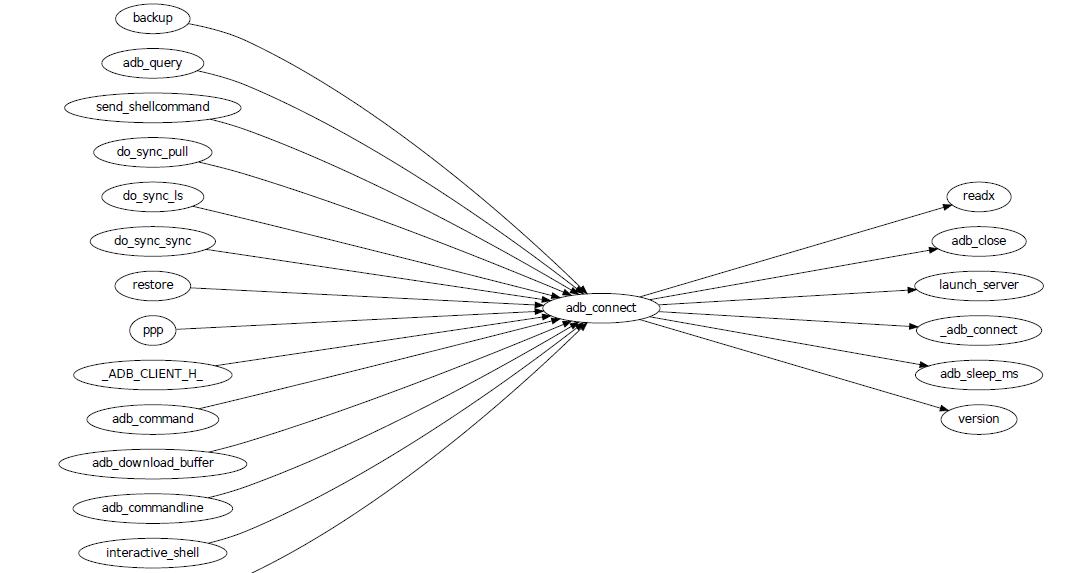
This picture is generated for the adb sub-project in android code. You
can see which functions are calling adb_connect, and which functions
are called by it.
It is generated using beagrep + ctags-exuberant + graphviz, using my wrap scripts like following in the android/system/core directory:
generate-call-graph.pl > call_graph.org
dot-partition.pl call_graph.dot -s adb_connect -m 1 -r 2
6 Other tools similar to beagrep
6.1 Opengrok
This tool is very much like beagrep, it also uses the Lucene search engine! Beagrep uses beagle, which uses the C# implementation of Lucene. I probably wouldn't start working on beagrep had I known opengrok earlier. That said, I'm glad I have beagrep, because it is Emacs friendlier😊
I do not use opengrok myself since I have beagrep already, but you are encouraged to try it out, it has quite a few nice features. Especially if you do not use Emacs for reading and writing code.
6.2 Ack/Ag
These 2 tools are faster grep, they do not use indexing. Author of Ack has maintained a quite complete list of other grep-like tools at this web page. Both opengrok and beagrep are listed there.
Footnotes:
Here's how I improved it from 0.8s to 0.23s: use Mono's AOT option to do the JIT optimization Ahead Of Time. I found out about this option when I was investigating why beagrep on my MacbookAir+Linux is consistently a few tenths of second slower than other machines, which is another story, see beagrep performance tuning on MacbookAir+Linux.
Here's how I run grep in Android source tree: time grep
-I -r --exclude-dir=.git --exclude-dir=.repo -e readlink
~/src/android. The first time it took 5m20s, second time
1m21s, and third time 3.5s, and it can't be reduced much
further. The result is retrieved on a ThinkPad T420 with 8G
memory. One thing notable here I think is that it could
require multiple runs to reach the minimum 3.5s. Another
thing is I tried it multiple times on my MacbookAir with
about the same debian installation, grep always takes
about 1m as the minimum. Was it because less memory (only 4G
for MacbookAir), or was it because SSD and thus different
caching strategy? It eludes me. (EDIT: it's because cpu
freq is locked at 800MHz, same as the above footnote, see
beagrep performance tuning on MacbookAir+Linux.)
As stated in the previous footnote, something must
have went wrong with this result, 30 minutes is just impossibly long
compared to the 5m20s cache cold and 3.5s cache hot stated above. Was
it because of a slower machine, or even being run within a virtual
machine (on a slower real machine)? I can neither remember nor
reproduce now. But I think one problem was the way I used grep, it's
something along the line of: find-filter-out-non-src-files | xargs
grep readlink. This will cause a lot of grep processes to be
created because on most systems there is a max number of characters
(typically 128k on 32 bit systems) limit with the command line
arguments. When this limit is exceeded, you will see something like
bash: XXX: Argument list too long. For this reason, xargs will call
its command multiple times. For e.g., when I run this command: seq 1
1000000 | xargs bash -c 'echo -n $#\ ' true, you'd expect 1000000
is printed, because xargs will pass this many arguments to the bash
command, but no, instead you will see (try it, see how slow it is!)
23692 21841 21841 21841... printed one by one because xargs must
invoke this bash command multiple times and each time pass just as
many arguments as possible. This is not the most efficient way for
calling grep (with all the arguments creating and passing around and
grep processes creating and exiting) and must have contributed to my
30 minutes measurement.